Boards and sprints
Boards and sprints reads your boards and sprints from Jira, as you, and helps you clean them up: orphaned boards, boards near their limit, sprints that share a name or break a convention, and sprints left behind. It is for Jira admins; a page reads Jira only when you ask.
On this page
Where to find it
| Where | What is there |
|---|---|
| Apps > TuneCraft > Boards and sprints | The tool. Its rail has Boards, Sprints, Left behind and Changes. |
Check and delete boards
Jira Software must be on the site. Jira lists only the boards you may view, so a board on someone else's private filter may not be checked.
Step 1: Check the boards
Open Boards and select Check these boards. It reads each board's configuration, filter and admins: about 3 Jira requests a board, as you. Names are never kept.
Step 2: Read what was found
Read What TuneCraft found on each row.
- Filter gone: the board's filter no longer exists.
- Filter owner deactivated; the board may still be in use: if it works, give its filter to an active person.
- No admin, Every admin deactivated: nobody can administer it.
- Near the limit, Full: a team-managed board with 90% or more of the 5,000 work items Jira allows. It is never deleted here.
Step 3: Pick and save
Only a board whose filter is gone, or whose filter's owner is deactivated, can be deleted. Tick up to 25, select Delete N boards, which shows once a board is picked, and download the record file. It is the only copy.
Step 4: Confirm
TuneCraft reads each board again and leaves one whose filter works again, one with an active sprint, and a team-managed one. Its filter and work items stay in Jira.
Read sprints
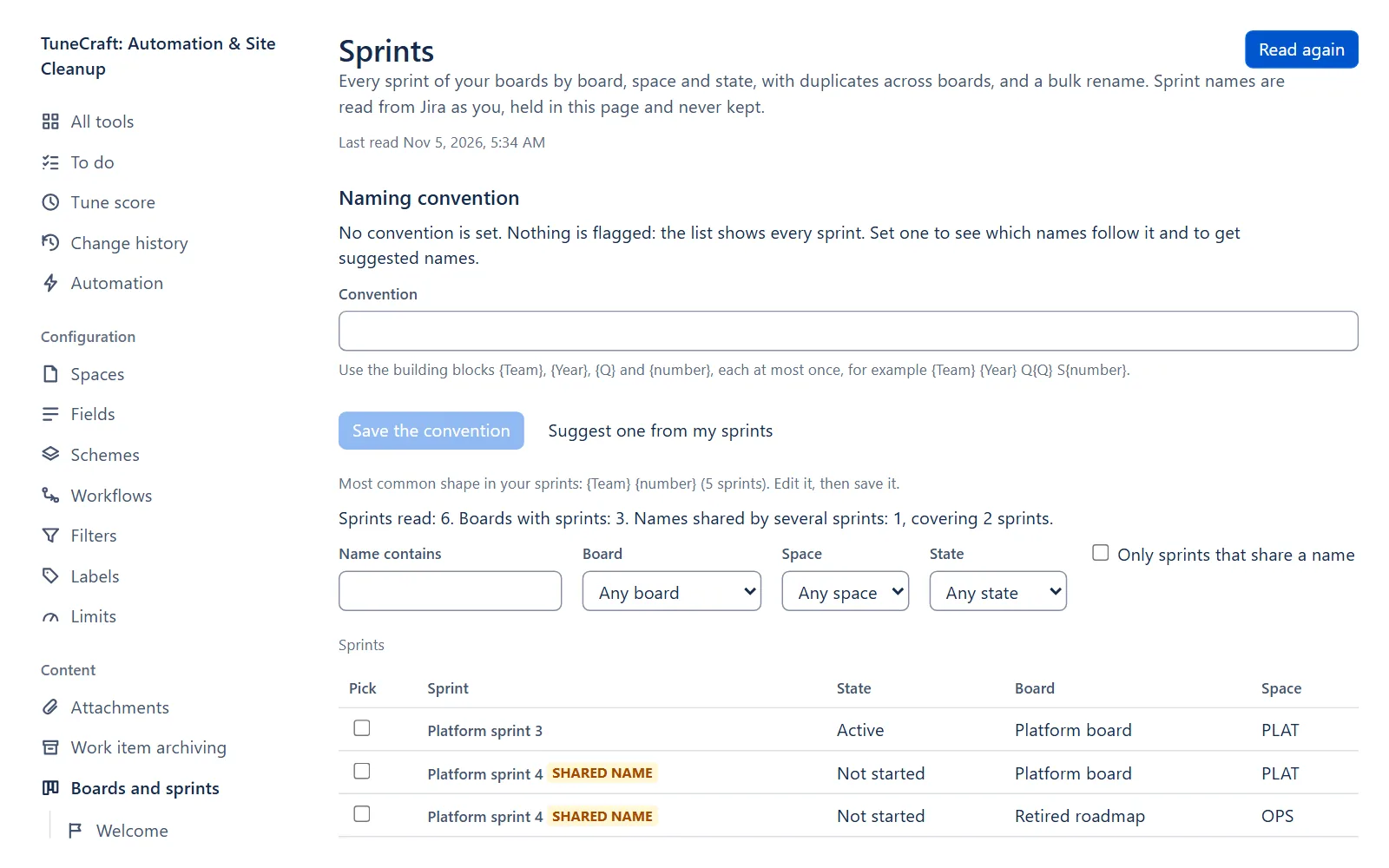
Sprints lists every sprint of your boards by board, space and state, with the names shared by several sprints marked Shared name. Select Read sprints: it reads your boards, the active and future sprints, then the closed ones. Jira counts a point for each request and one for each sprint, so one press stops at 600 points. Read more carries on, and Stop ends it where it is. Names are held in the page, never kept.
Set a naming convention
A convention is optional. With one, each sprint is marked Follows or Does not follow, and gets a suggested name. Under Naming convention, use {Team}, {Year}, {Q} and {number}, each at most once, for example {Team} {Year} Q{Q} S{number}, then select Save the convention. Suggest one from my sprints proposes the most common shape.
Rename or delete sprints
Step 1: Pick the sprints
Tick up to 25 sprints and select Rename N sprints.
Step 2: Choose the change
Choose Replace text, Add text before the name, Add text after the name, Tidy spaces or Use the suggested names.
Step 3: Save and confirm
Download the record file, then confirm. TuneCraft reads each sprint again and leaves one whose name changed since.
Important: A flow or saved filter that names a sprint stops finding it after a rename. Search them for the old names first, and tick the box that says you did.
To delete sprints, tick them and select Delete N sprints. Jira moves their open work items to the backlog and keeps no copy.
Find sprints left behind
Left behind lists active sprints past their end date and future sprints that never started: by default 14 days after the end date and 60 days after the start date. Change both (whole days, 1 to 3,650) under When is a sprint left behind?. A sprint that lacks the date it is judged by is never listed.
Step 1: Find them
Select Find sprints left behind. It reads active and future sprints only, at 600 points a press.
Step 2: Pick sprints and a destination
Tick up to 25 active sprints. Under Where do the open work items go?, choose The board's next future sprint, A new sprint on each board (type its name: one future sprint, with no dates, is made on each board that needs one) or The backlog.
Note: If a future sprint with that name is already on the board, the look says so before you confirm: the work items go to it. TuneCraft makes no second sprint, and the result counts those boards.
Step 3: Check what moves
Select Check what moves. The page reads each sprint again and says: the sprint is closed, then N open work items (not in the board's right-most column) go to the destination. A sprint it leaves has its reason beside it. Then download the record file: the close needs it.
Step 4: Close
Select Close N sprints and confirm. TuneCraft closes each sprint first, as Jira's Complete sprint does, so its open work items stay in it as not completed and show in the backlog. For a future or new sprint it then adds them to that sprint, 50 at a time.
Important: Jira cannot reopen a closed sprint, so a close cannot be undone.
To delete a future sprint that never started, tick it and select Delete N empty sprints. It is offered only when Jira counts no work item in it.
Limits of a close
| Limit | What it means |
|---|---|
| About 200 work items a sprint | The rest, and any Jira will not take, stay in the backlog, not completed. |
| Work items read twice | Once to list them, once before each batch: about 2 Jira points a work item moved (estimated). |
| Not confirmed | Jira did not say whether the sprint closed, and nothing moved. Check it in Jira: if it is closed, closing it again moves nothing. |
| A sprint with that name may be there | Jira did not say whether the new sprint was made. No second one was made: check the board's future sprints. |
A sprint is left as it is when it changed since the check, when Jira may hide some of its work items from you, when your rights do not cover every space of its board, or when its board is gone, gives no space, or has no future sprint.
What it changes in Jira and how to undo it
| Change | Where it is confirmed | Undo |
|---|---|---|
| Renames sprints | Rename sprints: N? | Undo in Changes, for 30 days |
| Closes sprints, and adds their open work items to another sprint | Close N sprints? | No undo. Jira cannot reopen a sprint. |
| Deletes sprints | Delete sprints: N?, Delete N empty sprints? | No undo. |
| Deletes boards | Delete the picked boards: N? | No undo. |
Reading changes nothing in Jira.
What it keeps
| Kept | What it holds |
|---|---|
| Record of changes | Ids, states and counts |
| Name hashes | Keyed hashes of old and new sprint names |
| Settings | The convention, the days for left behind |
No board or sprint name is stored. Sprints whose board is gone cannot be listed.
Related pages
- Naming conventions: conventions for filters and dashboards.
- Automation: flows that may name a sprint.
- Limits and troubleshooting: the points budgets.
Questions about the app? Write to info@plugincraft.ca.