Workflows
Workflows finds the workflows and statuses no space uses, statuses with a dead end, workflows that are copies or near copies, and the rules apps add to workflows. A Jira admin can delete what nothing uses, after TuneCraft asks Jira again.
On this page
Where to find it
| Where | What is there |
|---|---|
| Apps > TuneCraft > Workflows | Workflows, Statuses, Workflow schemes, Rules from apps, Changes |
| Jira settings > Apps > TuneCraft settings > Workflows | The background checks |
Turn on the checks
Workflows is for Jira admins. Until the background checks are on, each page says "TuneCraft has not read your workflows yet." and offers Turn on background checks. TuneCraft then reads workflows, statuses, workflow schemes, the spaces that use them and the rules apps add, weekly where the site's points allow and less often on large sites. The first reading starts within the hour. If TuneCraft's app user is not a Jira admin, it reads while a Jira admin has the tool open. A late reading is marked as late. A Jira admin sees Read again now beside it when the tool's check is late and not already running or asked for. See Background jobs.
The Workflows page
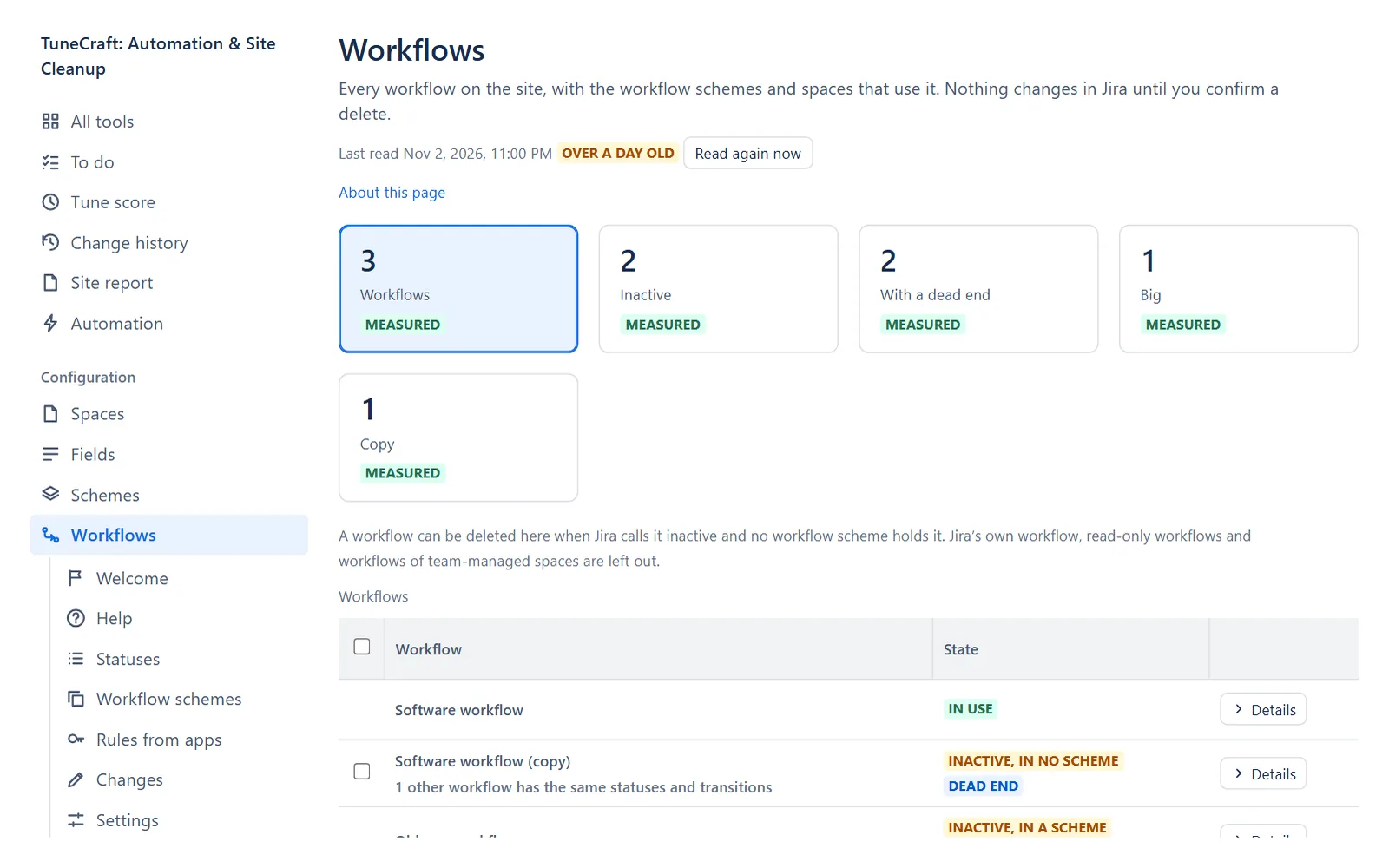
The tiles are Workflows, Inactive, With a dead end, Big and Copies, and each filters the table. The table shows each workflow's State, Size, Schemes and spaces, Rules from apps, Dead ends and Updated. Details opens a row. Whether a space uses a workflow is Jira's own flag (measured).
| State | What it means |
|---|---|
| In use | Jira says a space uses it. |
| Inactive, in a scheme | No space uses it, but a workflow scheme holds it. |
| Inactive, in no scheme | No space uses it and no workflow scheme holds it. The clearest one to remove. |
| Inactive, schemes not read | No space uses it, and the workflow schemes were not read. |
| Team-managed | It belongs to its space. TuneCraft does not propose it. |
- Dead end: a status that no transition leaves and that is not in the Done category. It is information, not a fault.
- Big: 25 statuses or more, or 60 transitions or more. That is TuneCraft's threshold, not Jira's.
- Copies: workflows with the same statuses and transitions. Nearest workflows in the details lists near copies that share at least half of them. It is not worked out on a site with more than 800 workflows. Jira Service Management makes a workflow for each space it creates from a template, so copies are normal there.
Note: TuneCraft does not count the work items on each status of a workflow, and cannot see what happens inside apps, such as listeners and scheduled jobs. Check those before you delete anything.
Statuses
Statuses lists every status with its Category, how many Workflows it is on, how many Work items have it and which Flows name it. A status is proposed only when:
- it is on no workflow a space uses (Jira's flag);
- no work item has it (Jira's count, which leaves out archived work items);
- no flow of the last scan names it.
If flows name it, or the last scan could not tell, the row says so and does not propose it. Jira lets you delete a status only when no workflow has it: delete those workflows first.
Rules from apps
Rules from apps lists the conditions, validators and post functions that apps add to transitions, by app or by workflow (Group by). Jira lists it says whether Jira's list of available rules still shows the app: Yes, No or Not sure. TuneCraft sees only that a rule exists and which app provides it, not what it does.
Delete what nothing uses
A Jira admin can delete a status, an inactive workflow in no workflow scheme, or a workflow scheme no space uses. TuneCraft leaves out team-managed spaces' objects, Jira's default workflow and default scheme, and read-only workflows. It cannot see what apps, scripts and integrations name: check them before you delete.
Delete schemes first, then workflows, then statuses: after deleting schemes or workflows TuneCraft says how many workflows are now in no scheme, or how many statuses are now on no workflow, and offers Read again. It never chains deletes.
Step 1: Select the rows
On Statuses, Workflows or Workflow schemes, select rows that can be deleted, up to 25 statuses, 10 workflows or 10 schemes at a time. Then select the button, for example Delete 3 statuses….
Step 2: Read what was checked
The dialog says what TuneCraft checked in Jira just now, as you, and what it did not: apps and integrations, saved filters and boards, archived work items, work items you may not see, and flows made or changed after the last scan. A status also needs a scan from the last 7 days that holds what flows name.
Step 3: Download the record file
Select Download the record file. It holds each object as Jira has it, so you can build it again by hand. Keep it private: it may hold secret settings.
Step 4: Confirm
TuneCraft deletes one object at a time, asking Jira again before each, and shows Jira's answer for each. One that changed since, or that Jira refuses, is left as it is.
Note: If the page closes or Jira asks for a pause, the person who started the delete can Carry on. Any Jira admin can Stop it from Changes. A stopped delete is over.
What it changes in Jira and how to undo it
| Change | Where it is confirmed | Undo |
|---|---|---|
| Deletes statuses | Delete N statuses | No undo |
| Deletes inactive workflows | Delete N workflows | No undo |
| Deletes workflow schemes | Delete N workflow schemes | No undo |
Important: Jira has no trash for statuses, workflows or workflow schemes. A status made again has a new id, so flows and filters that named the old one do not find it.
Note: During a trial each tool can change 10 objects in all. See Licence and trial.
What it keeps
Ids, counts and days: each workflow's and status's id, its sizes, a code made from its statuses and transitions (for copies), a code made from a status name with your site's key, and each app rule's kind and the app's identifier. Never a name, and never a rule's settings or scripts. If you turn the checks off, what they read is removed within a day.
Related pages
- Spaces: the spaces that use a workflow scheme.
- Run health, governance and usage: Check before you delete.
- Background jobs: the checks and when they ran.
Questions about the app? Write to info@plugincraft.ca.